QPM vs Forecast: Two Approaches to Automated Planning – and Why the Mechanism Matters More Than the Promise

Forecast, like QPM, has an automatic project planning feature: one button – and the system sets estimates, assignees, and a completion date on its own. So this comparison isn't about checkboxes in a table, but about the mechanism under the hood: how exactly each system arrives at its plan. Two tools with the same promise can produce fundamentally different results – and fundamentally different accountability for them. –
How Auto Schedule in Forecast Actually Works
Credit where it's due: Forecast describes its mechanics openly. The system suggests time for each task based on historical data, the role you're most likely to add to that task, and the people available – and whether to use these estimates is entirely up to the project manager. You press the Auto Schedule button after creating a task list – and the AI turns it into a schedule in seconds: assigning resources, adding estimates, and proposing a project completion date.
Underneath are regression models: based on historical data from previous projects, Forecast suggests how many hours or story points a task might take. The AI learns from your best projects and best managers to give recommendations tailored to your company. On top of that, the system detects anomalies: when something goes wrong with estimates or time logging, the platform starts warning managers about a potential threat.
This is honest, mature ML architecture. But it has four structural consequences worth understanding before you buy.
Four Consequences of the ML Approach That Brochures Don't Mention
1. The forecast inherits the past – including its mistakes
A model trained on your historical projects suggests estimates "the way it usually went." If your past projects systematically missed deadlines (which is exactly why teams look for tools like this), the model learns from data with those same misses baked in. And for a new type of project – a new technology, a new game genre, a new client – there simply are no historical analogues. This is the classic cold-start problem: the system is weakest exactly where the risk is highest.
This isn't a theoretical objection. Reviews contain precisely this phrasing: "the forecasting logic didn't match how we track projects; customization felt limited, and it was hard to work around."
2. The recommendation doesn't explain itself – and doesn't carry accountability
Auto Schedule proposes a date. Why this one? Because "similar tasks took this long before." When a client or publisher pushes on timelines, "the model said so" doesn't hold up as an argument – and an ML system doesn't let you break the forecast down into components to show where exactly the bottleneck is.
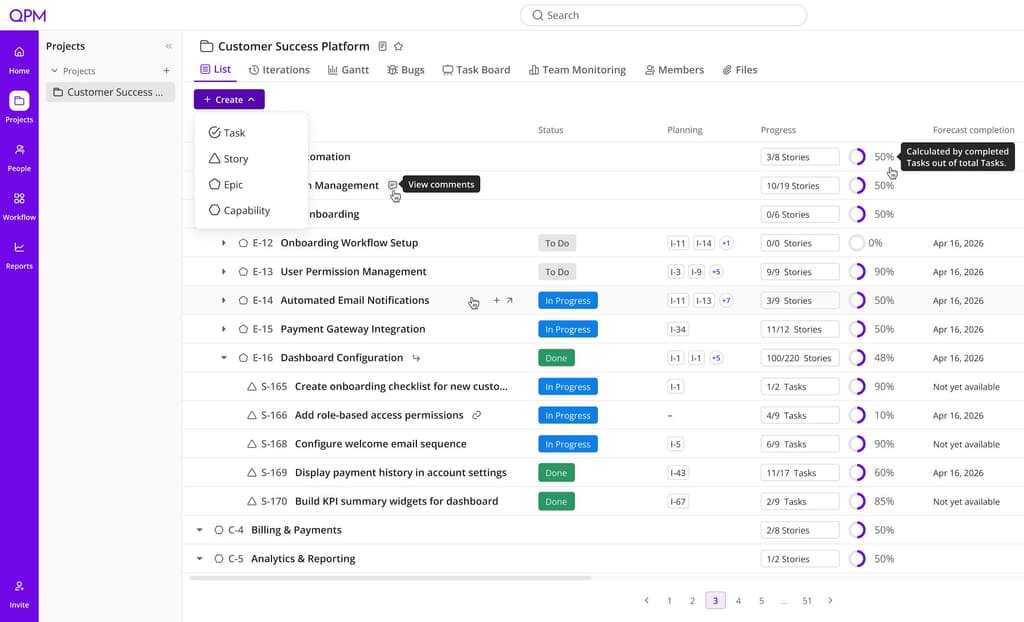
QPM takes a different path: the calculation is deterministic and fully decomposable. The date is the 22nd – because task A is waiting for a Senior-level reviewer who frees up on the 15th, plus two days of review, plus a buffer on the critical path. Every element can be verified, challenged, and changed – and you'll see how the date shifts.
3. A role is not a person
Note Forecast's own wording: the system suggests "the role you're most likely to add to this task." A role. In a cross-disciplinary team, there's a chasm between "we need a 3D artist" and "only Maria can do this task, because she's the only one who's worked with this pipeline, and her reviewer has to be one level higher."
In QPM, the skill graph operates on specific people: skills, level, seniority, current workload. And it flags what a role-based model can't see in principle: a task requires a skill nobody has; the reviewer needs to be one level higher and no one at that level exists; there's one person on a track and no possible reviewer. This turns planning into a team audit – and hands you a ready-made case for hiring.
4. Review is the forecast's blind spot
Forecast is strong at predicting execution, but the multi-stage verification cycle – who reviews each stage, at what qualification, how long it takes – isn't part of its planning model. Review time dissolves into the historical data of "how long tasks like this usually take."
In QPM, Review Flow is an explicit part of the calculation: code review → product review → business validation → final approval, each stage with an assignee and a duration, all built into the completion date from the start. A task doesn't close until it passes every step; if rejected, it returns to the assignee or is automatically reassigned.
What Else to Know Before Choosing Forecast – Practical Details
Pricing is now closed. Plans used to be public – Lite from ~$29 and Pro from ~$49 per seat, with a 10-seat minimum on annual billing. Now the site offers only a personalized quote through a conversation with a PSA expert. Forecast itself doesn't recommend the platform for companies under 15 people, given its pricing model and feature depth.
There's no mobile app. Forecast has no dedicated mobile app, and users note limited usability in mobile browsers – especially for time tracking.
The learning curve. The interface is clean, but users note that initial mastery takes effort – the platform is large, because it combines projects, resources, and finance.
The task level is recent. A telling detail from a vendor reply to a review: "if you need task-level scheduling – we just released it." That says a lot about the product's DNA: Forecast grew out of allocations and finance, and is building the task level now. QPM was built from the task up from day one.
Where Forecast Is Objectively Strong
The full PSA loop. Automated time tracking, invoicing, revenue recognition, budget control, and reporting – for a services business where project = contract = money, this is rare completeness in a single system. Company-wide utilization is calculated automatically.
Early warning at the portfolio level. The AI analyzes live delivery data, spots trends, and flags emerging risks – while there's still time to correct course. For an operations director watching 30 projects at once, this is worth more than precision on any single one.
The integration ecosystem. Jira, Salesforce, HubSpot – Forecast deliberately embeds itself into your existing stack, pulling in data for its analytics.
QPM vs Forecast: Direct Comparison
How to Choose
Forecast is the right choice if you're a services company of 25–200+ people, where a project is first and foremost a contract with a budget and a margin, and the system's main consumers are the operations and finance directors. The full PSA loop from planning to invoice in one platform is a real advantage that QPM doesn't offer. If your projects look alike year after year, Forecast's ML predictions will keep getting better.
QPM is the right choice if your projects don't look alike, the date in the contract demands justification rather than a prediction, and quality depends on exactly who executes and exactly who reviews. Game studios with unique productions, product teams with a complex review pipeline, outsourcing shops where every missed deadline is a penalty. What's needed here isn't a forecast by analogy, but a calculation you can break down, verify, and defend in front of a client.
In short: Forecast predicts the future based on the past. QPM calculates the future based on the present – the real people, skills, and constraints of your team right now.
You've compared — now test it on your own team
Leave your email and we'll show you the difference not in a table, but on your real iteration: with your people, skills, and deadlines.