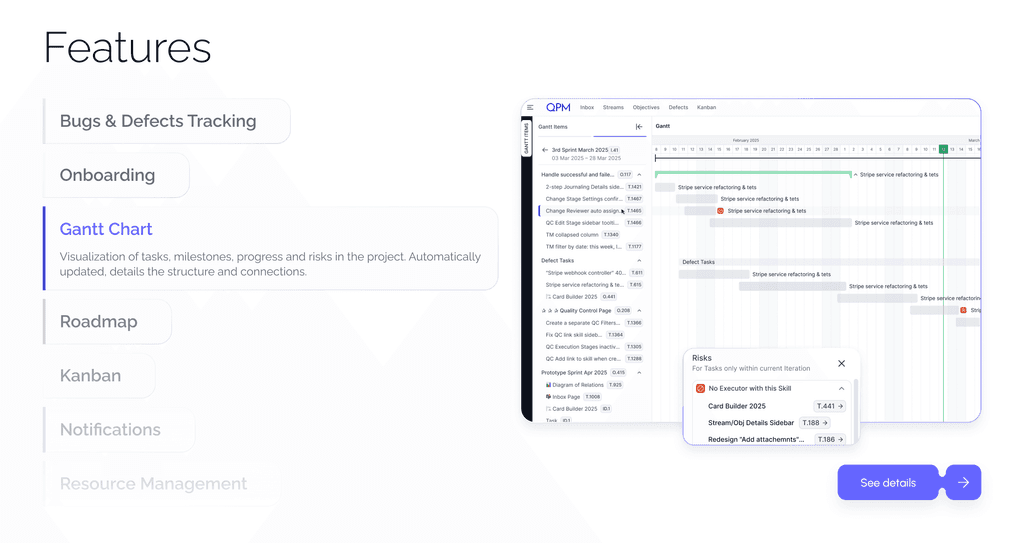
Gantt Diagram
A complete view of the project on a timeline
Visualize all iterations, objectives, tasks, and dependencies in a single tool.
Gantt in QPM displays real progress, risks, deadlines, deviations, and task relationships — in real time.
No chaos. No manual updates. Just clear control over project execution from the first iteration to the release.

Who benefits from Gantt Diagram

Product and project managers
See the complete picture of execution of strategic objectives and all decomposed tasks, control deadlines, risks, dependencies, and priorities, and synchronize releases with business goals.

Team Leads
Track tasks, dependencies, and priorities, align execution with the iteration plan, and see which blockers may affect timelines.

QA teams
Control tasks related to testing and defect fixes, understand the criticality of bugs, and their impact on the release.

Reviewers
Clear sequence of checks and automatic movement of tasks through quality control stages.

Executives and stakeholders
Receive a high-level overview of product progress, timelines, and deviations — without needing to dive into small operational details.
Developers and designers
See how your tasks fit into the overall picture, track dependencies, and understand what needs to be done now and what can wait.
Key features
Gantt Diagram displays all iterations, objectives, and stream tasks on a timeline — with real dates, statuses, and dependencies.
Learn more about QPM

How the Gantt Diagram Works
After selecting a stream, QPM automatically builds a time grid including all iterations and their planned dates. It creates a framework for placing objectives and tasks.
Benefits of Using the Gantt Diagram

Instant understanding of the project’s real status

Transparency for the entire team

Identifying risks before they become problems

Realistic iteration planning

Dependency control and alignment with business goals
Optimizing the work of the entire team
Learn more about QPM