QPM vs ClickUp: A Comparison for Teams That Need More Than “Everything in One Place”

ClickUp is the most powerful AI layer among PM tools. QPM is a different logic: not an AI assistant on top of tasks, but a deterministic planning system where skills, dependencies, buffers, and Review Flow (RW) are built into the timeline calculation itself.
Where ClickUp Excels
ClickUp is the “everything app for work,” and it takes that positioning seriously. Over 15 task views, built-in docs, Whiteboards, native time tracking, sprints, Gantt with Baselines, automations, dashboards with 50+ widgets, and built-in chat — all under one roof.
In 2026, ClickUp went deep into AI: Brain became a full AI layer, and Super Agents are AI “colleagues” that can be assigned to tasks, mentioned in comments, and configured with hundreds of skills. ClickUp Brain can even predict that a project will be late before it happens.
For teams that want to replace five different tools with one and are willing to invest in an AI add-on, ClickUp delivers on that. Its customization flexibility is among the highest on the market.
Where the Real Line Between ClickUp and QPM Runs
It's worth dispelling an outdated myth right away: ClickUp does have auto-assignment, it does have AI delay forecasting, and native skill fields in profiles are coming. So the comparison “ClickUp doesn't have this” is inaccurate.
The real difference is deeper and architectural: in ClickUp, it's an AI layer on top of tasks; in QPM, it's native planning logic.
ClickUp Brain gives suggestions based on prompts and your workspace context — this is a separate paid add-on (roughly $5–28 per person per month) that advises, generates, and automates. QPM doesn't advise — it calculates. The skill graph (a system that assigns tasks based on skills and qualifications), resource availability and constraints (resource-constrained scheduling / critical chain), and the RW cycle are part of the iteration planning mechanism itself, not an assistant that “helps.”
Let's look at this point by point.
Auto-Assignment: AI Suggestion vs. Deterministic Distribution
ClickUp has AI Assign via Brain and autonomous Super Agents that can assign tasks. But this is AI that interprets a prompt and context — the result depends on data quality and phrasing, and accuracy can drop noticeably on complex, multi-step tasks.
QPM assigns tasks using deterministic logic: skills, qualification level, seniority, real current workload, and availability. The system explains every choice and lets the manager override it. This isn't an AI recommendation based on a prompt — it's a calculation based on the team's actual state right now.
AI is good at proposing the next step — here and now — but the further ahead and the more complex the task, the more it errs, and the more expensive the calculation becomes. This is where the technology hits a fundamental limit. No AI will build a deterministic three-month plan that accounts for vacations, work across time zones, holidays in different countries, task dependencies, and reviewer dependencies on specific tasks. QPM does exactly that: deep, precise forward planning that factors in every estimate and adds buffers, while AI remains a helper for the next immediate step.
Skill Matrix: Custom Fields / Roadmap vs. a Core Element
Right now, skills in ClickUp are custom fields on a special “user” task — a workaround. Native skill, role, and department fields in profiles are a 2026 roadmap item for ClickUp, which will enable utilization analysis and AI resource recommendations.
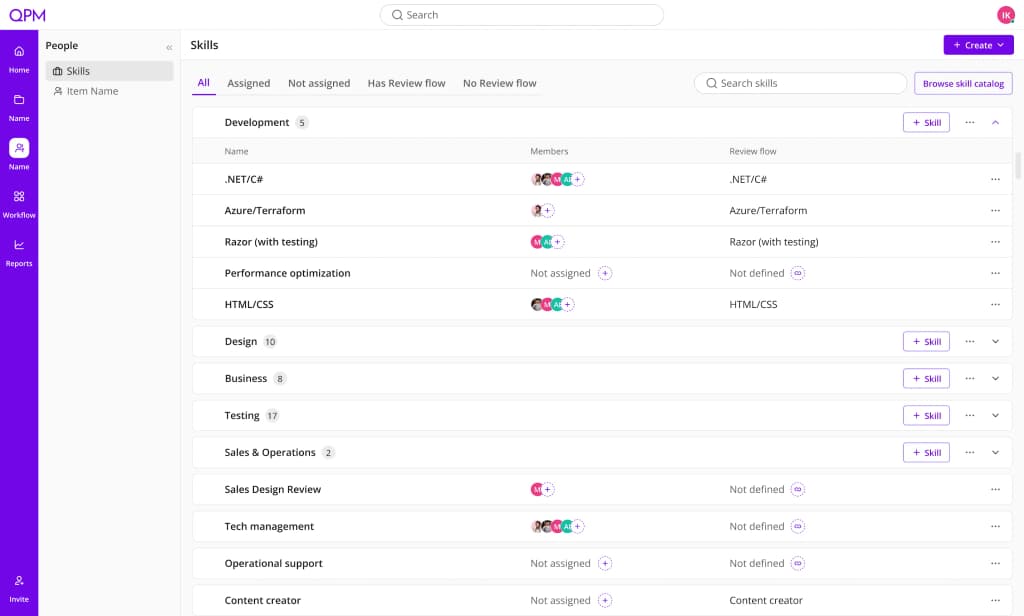
In QPM, the skill graph is the foundation everything else is built on: assignment, planning, timeline calculation, and Review Flow (RW). Not a field you fill in, but the logic that determines who can do what.
A valuable side effect of the skill graph in QPM is that it immediately highlights staffing gaps at the planning stage. If a task requires a skill nobody has; if the reviewer needs to be one level higher and no one at that level exists; or if there's only one person on a track with no possible reviewer — QPM flags this as a risk in advance, not after the task is already stuck. This helps identify exactly which skills are missing and makes an immediate case for expanding the team to improve quality. No task tracker gives you that.
Estimated Iteration Completion Date: AI Forecast vs. Calculation with Review Flows
ClickUp Brain can forecast delay risk — this is an AI prediction based on activity. Useful, but it's a probabilistic signal, not a precise answer.
QPM answers a concrete question: “If we start the iteration on the 1st with these tasks and this team — when will we actually finish, accounting for skills, workload, vacations, and all RW stages?” The output is a calculated date with an explanation of where the bottleneck is. Not a risk forecast — an actual date.
Review Flows: Custom Workflows vs. Built Into Planning
Multi-stage Review Flow in ClickUp is built manually: custom statuses, automations, dependencies. This is flexible, but it requires setup and doesn't factor into timeline calculations — review time isn't accounted for automatically.
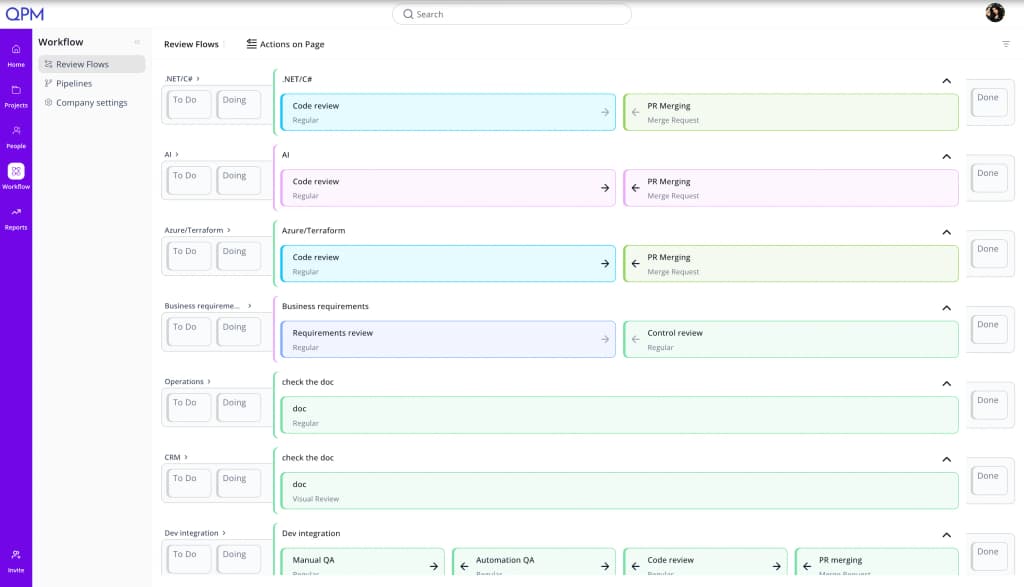
In QPM, multi-stage RW is configured once and is automatically factored into every iteration's planning. For each stage, you define who reviews it (by role or qualification level) and how long it takes. A task physically cannot move to “done” without passing every step. If rejected, it returns to the assignee or is automatically reassigned.
Vacations and Capacity: Roadmap vs. Real Time
This is one of the few areas where ClickUp is still openly weak. Right now, blocking capacity for a vacation means maintaining a parallel out-of-office list. Native vacation tracking that automatically reduces capacity and blocks task assignment is a 2026 roadmap item.
In QPM, vacations, sick leave, and departures are reflected in the plan immediately and automatically recalculate iteration dates. No separate list to maintain.
Buffer Time Planning: Manual Padding vs. a Dedicated Mechanism
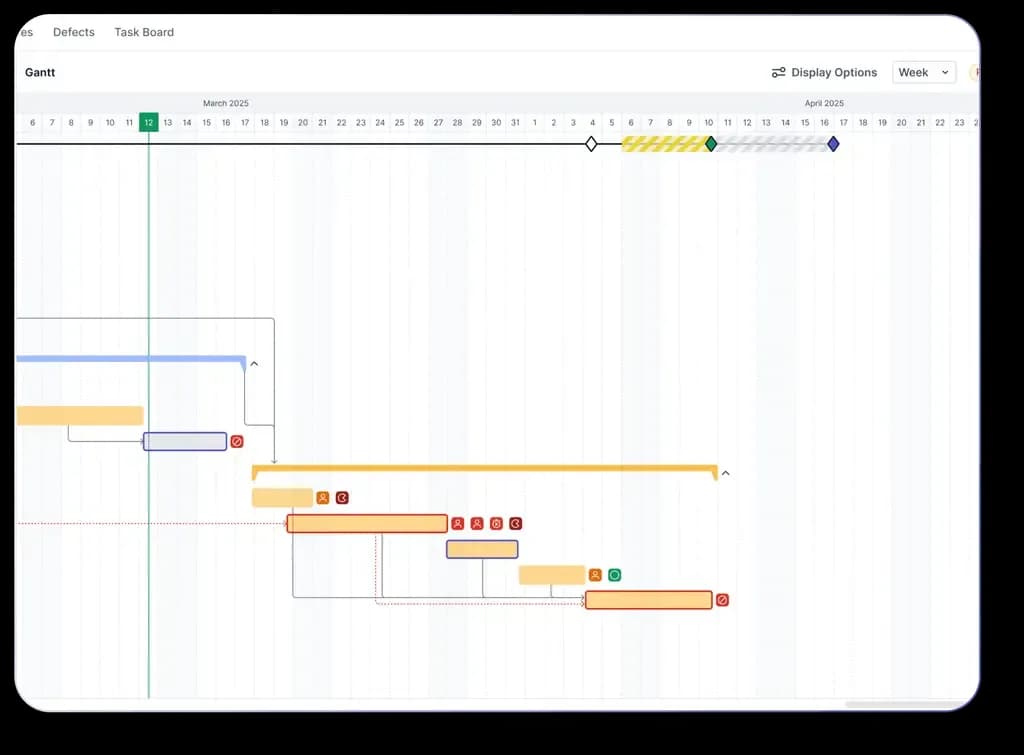
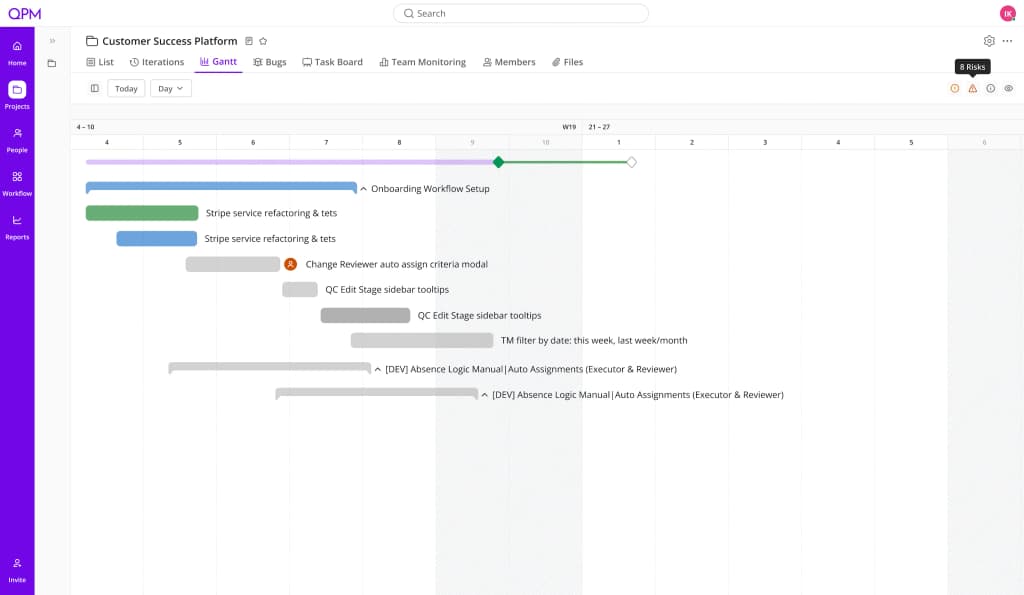
In ClickUp, a buffer is manual padding added to a task estimate. QPM has a dedicated Buffer Planning mechanism: buffers appear on the Gantt chart, recalculate dynamically as things change, and show which tasks are “eating into” the reserve — before the deadline is actually missed.
It's worth noting that in QPM, the buffer is calculated at the individual task level and only where it actually affects the deadline: on the critical path, for tasks that could realistically shift it. The result is a shorter deadline at the same level of reliability — not an inflated reserve added just in case, but a precisely calculated timeline. This can be a winning strategy when quoting an estimate to a client.
Gantt: Baselines vs. Simulation
ClickUp added Gantt Baselines — it freezes the schedule at a given moment and overlays it on the live timeline so you can see which tasks have shifted. This is a plan-vs-actual comparison, after the fact.
QPM has Simulation mode — checking whether the team can handle the iteration's workload before it even starts. Tasks without an assignee, without a reviewer, or requiring rare skills that may be unavailable are highlighted. Not “what already shifted,” but “what will shift if we run it this way.”
QPM vs ClickUp: Direct Comparison
How to Choose
ClickUp is the right choice if you need a single tool to replace docs, chat, time tracking, and tasks, you want a powerful AI layer for generation and automation, and you're ready to invest time in onboarding and budget for an AI add-on. It suits teams with simple or moderately complex workflows where timeline forecasting precision isn't critical.
QPM is the right choice if the critical question is “when will the iteration actually finish and is the deadline realistic” — and if you have cross-disciplinary teams where a performer's skills directly affect quality and timelines. Game studios, product teams with a complex RW pipeline, agencies with parallel projects.
In short: ClickUp gives you AI that advises. QPM gives you a system that calculates.
QPM and ClickUp Aren't Always Competitors
Some teams use ClickUp for docs, wikis, chat, and general communication — and QPM for iteration planning, resource management, and quality control. Both tools support integrations, so this kind of stack is entirely realistic.